
An artifact is any file that is generated during the development process and that can be shared or deployed.
The dependency manager is responsible for calling the factory, bringing the parts, and ensuring they arrive in the correct order.
Instead of manually downloading .jar files from the internet and pasting them into a folder, you simply note in your build.gradle what you need.
The manager (like Gradle or Maven) analyzes the entire map and decides which version is the most compatible so that nothing crashes.
- Maven Central: The public global repository
- Nexus: Your own private repository
spring-boot-starter-web, that “soldier” doesn’t come alone; it brings with it Tomcat, Jackson, Spring MVC, etc.
I was creating a championship, the word “championship” can be replaced by “example” in the GitLab repositories.
It was a name that stuck, but it should be called something else.
maven (pom.xml) vs gradle (build.gradle)
It’s not exactly that one is the evolution of the other, but rather that they are two distinct philosophies.
Maven:
- It is based on XML files (pom.xml)
- Doing something that’s not in the Maven manual is a headache
- XML is verbose (many lines to say little), but it is very easy for automated tools to understand.
Gradle:
- configuration file: build.gradle
- It is based on real programming languages like Groovy or Kotlin (is called DSL)
- “Total flexibility.” Since it’s code, you can program conditions (like the if statement you could use to load credentials from an .env file)
- It is said to be the evolution because it takes the best of Maven (dependency and artifact management) but removes the rigidity of XML
- It’s much faster than Maven thanks to a background daemon and a very clever incremental caching system. It doesn’t recompile what’s already good.
Maven remains extremely stable and is preferred in bank or very conservative projects where “they don’t want surprises” and prefer that no one touches the construction logic.
In other words, in build.gradle, Gradle uses the Groovy DSL.
known files:
in pc:
~/.gradle/gradle.properties- It’s not part of our project
- These are credentials you don’t want to upload to GitHub or GitLab
in project:
build.gradle: He is the technical director of the project, he controls all its aspects, the most important aspect being dependencies, that’s why Gradle is said to be “a dependency manager”. (It is programmed in Groovy (it works with the JVM); a script is programmed instead of an XML) (Groovy DSL is the Groovy script + reserved words)settings.gradle: This file is what gives your project its name. It must be in the root of the folder.resources/application.yamlresources/application.properties
Don’t leave your Nexus passwords visible in your build.gradle file. Create a file called .env in the project root to securely store your credentials:
NEXUS_USER=axeldamian10
NEXUS_PASS=xxxx
SERVER_PORT=9090
use them:
plugins {
    id "io.github.cdimascio.dotenv" version "3.0.0"
}

repositories {
    maven {
        url "http://localhost:8081/repository/maven-releases/"
        allowInsecureProtocol = true
        credentials {
            username = env.NEXUS_USER
            password = env.NEXUS_PASS
        }
    }
}
Entering the local Nexus repository (localhost:8081) and you must go to browser
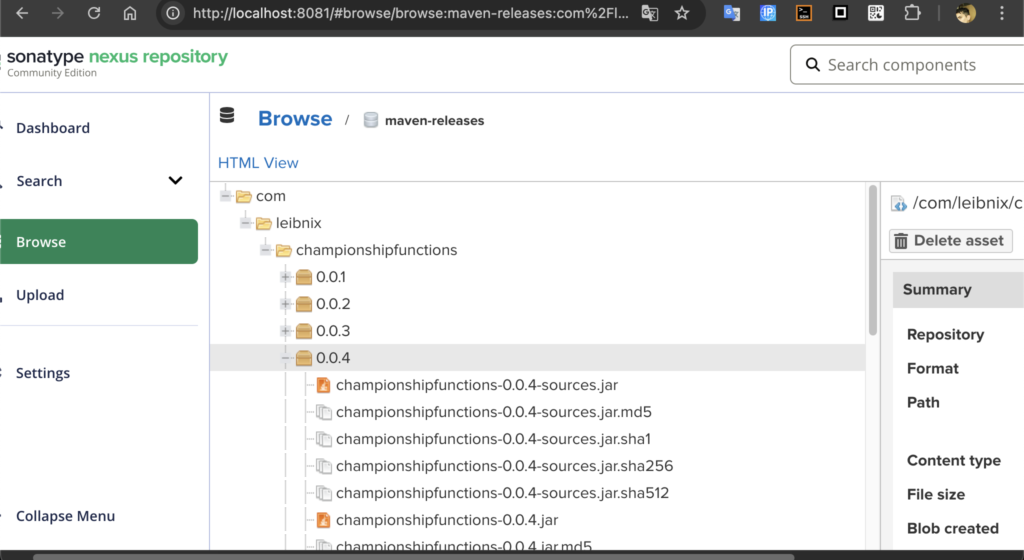
the links:
B: (functions or library)
https://gitlab.com/com.leibnix/championshipfunctions
A (A consume to B) (the api-rest):