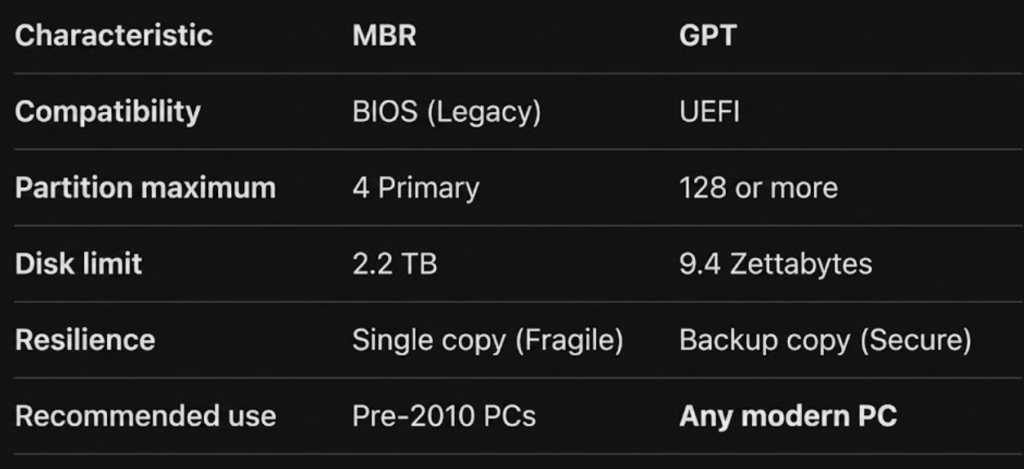
It is a concept of the Partition Table (Division Logic)
It is the “Index” or “Map” that tells the computer where each partition begins and ends
Without this map, the BIOS or UEFI would see the disk as a giant mass of bytes and wouldn’t know where your Kernel or your files are located
File System: It is a concept of the Content of that division (Organizational Logic)
MBR (Master Boot Record)
It’s the standard that originated in the 80s. It’s simple, but it has limitations that would be too small for modern development.
Sector 0 (the first physical sector of any hard drive or SSD) is what we historically know as the MBR (Master Boot Record)
- Location: It always resides in the first sector of the disk (Sector 0)
- Partition Limitation: It only allows 4 primary partitions. To have more, you have to use “extended partitions,” which is a workaround
- Size Limit: It can only address up to 2.2 Terabytes. If you install a 10 TB disk, the rest will be invisible to the system
- Fragility: There is only one copy of the map. If that first sector is damaged, you lose access to the entire disk
GPT (GUID Partition Table)
It’s the modern standard and part of the UEFI specification. It’s much more robust and is what you’ll most likely use for your kernel.
- Almost unlimited: It allows up to 128 partitions (on Windows) and can handle ridiculously large disks (Zettabytes)
- Security (Redundancy): GPT stores a copy of the partition map at the beginning of the disk and another copy at the end. If one fails, the system recovers from the other
- Error checking (CRC32): It has a system that checks if the partition map data has been corrupted. If a kernel bug writes to the wrong place, the system detects it
- Unique Identifiers (GUID): Each partition has a universally unique ID. It no longer matters if the disk changes ports; the system recognizes it by its unique identifier
One very clever thing about GPT is that in the first sector (LBA 0) it puts a “Protective MBR”
- This ensures that if you connect the disk to an old PC with BIOS, the system won’t think the disk is empty and erase it; it will simply see a giant partition of type “unknown”
If you’re going to work with UEFI, your disk should be configured in GPT
A partition can exist without a file system?
Yes, it can perfectly exist.
It’s like putting a fence around a vacant lot: you have the space delimited, but you haven’t built anything inside yet
You can have the “box” (partition) empty with no “file computer” (file system) inside
Examples of partitions without a file system:
- “Raw” partition (Unformatted)
- Swap Space (In Linux, it is very common to have a Swap partition)
- Does it have a file system? Not in the traditional sense (like exFAT or ext4). You can’t just go in and “see folders”
- What is it? It’s simply a block of data that the kernel uses to dump RAM. It has its own binary structure, but it’s not a hierarchical filesystem
- Use for “Database” or low-level applications
- Some high-performance databases prefer to use raw partitions (Raw Devices)
- Because they don’t want the OS file system (ext4, NTFS) to slow them down with its own cache management and permissions. The application writes directly to the disk sectors