
GPT (partition)
- alternative MBR (old)
EFI (specification) – ESP (EFI System Partition)
- It’s an actual physical partition within your GPT disk
- Format: It must always be FAT32 (it is the only language that all UEFI understands by default)
- Contents: This partition is where you’ll store your kernel and boot loaders. On macOS or Linux, it’s usually mounted at /boot/efi
- It’s the “garage” where you store the .efi file so the PC can boot
UEFI (implementation)
- firmware
- alternative of BIOS
- UEFI looks at the disk’s GPT table to find a partition marked as ESP
- Once it finds the ESP, it enters the FAT32 file system and looks for a file with the .efi extension (such as /EFI/BOOT/BOOTX64.EFI)
- UEFI loads that file into RAM and passes control to it. That’s where your code starts!
- UEFI was originally designed by Intel and adopted this standard so that the firmware would have a predictable structure: a header that says where the code starts, where the data is, and what permissions it has
- Your Mac’s UEFI will read the .efi file, and that .efi code will be responsible for reading your ELF file and running it
.efi (Besides being a standard specification, it is also a file extension)
- It is an executable binary file
- It is the official UEFI “executable” (PE format)
- .efi (PE/COFF): This is the format that UEFI firmware understands. It is essentially a modified Windows executable file designed to run in the operating system’s pre-boot environment
- It’s not for an Operating System, but for the Hardware (UEFI)
- Is it Assembler? No, but you can easily “translate” it to Assembler (disassembled)
- The Format: PE/COFF
- Inside that binary file are pure CPU instructions (Machine Code)
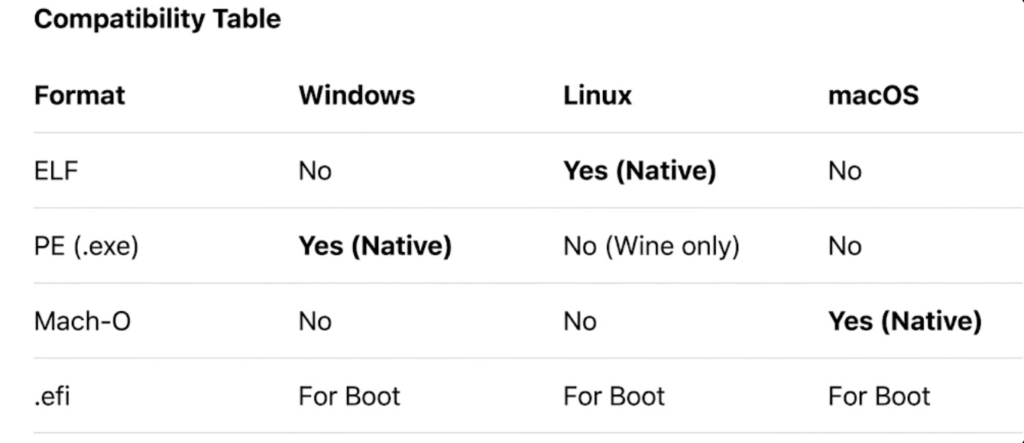
- Windows, Linux, and macOS: All three use it, but only during the boot process
- It is not interpreted: Unlike Java (which needs the JVM), the firmware loads the .efi into RAM and tells the CPU: “Start executing from this address”
- It’s the file that tells the computer: “Stop looking at the hardware and start loading the operating system (Windows, Linux, or Mac)”
- You write in C or Assembler
- The compiler (like gcc) and the linker (like ld) transform that text into the binary bytes that make up the .efi file
- It is the extension of the executable file that UEFI knows how to run
- What it is: A file in PE (Portable Executable) format, very similar to a Windows .exe, but designed to run in the pre-operating system environment
- The final result will be a file called, for example, BOOTX64.EFI
- Since it’s a binary that runs “in the air” (without an operating system yet), it can’t use standard C libraries like printf or malloc. You have to use the functions that UEFI itself provides in a table at startup
- If the content is PE/COFF: The file follows Windows/UEFI rules. It begins with bytes
4d 5a(Mark Zbikowski’s signature). Only this format can be an .efi file - The UEFI reads it, executes it, and this code (written by you) is what “learns” to read ELF files
- The universal language that all modern computers understand in order to boot up
create file
You need the C compiler and the EFI development libraries:
sudo apt update
sudo apt install gcc GNU-efi binutils
The Source Code (main.c)
learn: argc/argv, EFI_HANDLE, EFI_SYSTEM_TABLE
The signature of the “Main” is different from that of a normal program.
#include <efi.h>
#include <efilib.h>

EFI_STATUS
EFIAPI
efi_main (EFI_HANDLE ImageHandle, EFI_SYSTEM_TABLE *SystemTable) {
    InitializeLib(ImageHandle, SystemTable);

    // Imprime en la pantalla antes de que exista el SO
    Print(L"Hola Axel, este es tu Kernel arrancando...\n");

    return EFI_SUCCESS;
}
Compile to object (.o): Use -fpic and -fshort-wchar (because UEFI uses 16-bit characters)
Link (.so): A special shared object is generated
Convert to EFI Binary: Use objcopy to transform that .so file into a real .efi file
To avoid writing 20 commands, it’s best to use a script or Makefile. Basically, the final conversion command looks like this:
objcopy -j .text -j .sdata -j .data -j .dynamic \
        -j .dynstr -j .rel -j .rela -j .reloc \
        --target=efi-app-x86_64 main.so main.efi
In QEMU: Use an emulator on your Ubuntu system to avoid restarting your physical PC every time you compile
qemu-system-x86_64 -pflash bios64.bin -hda fat:rw:directorio_donde_esta_tu_efiELF (Executable and Linkable Format)
- It is the native standard for Linux and Unix-like systems. It is extremely flexible and designed to be loaded by an already running operating system (Unix world standard)
- It is the format that defines how programs, dynamic libraries (.so) and core dump files are structured
- It is the absolute standard of the Unix world
- macOS: It doesn’t use it. macOS uses a format called Mach-O. Although both are Unix-based, Apple chose to use its own structure
- Windows: Does not use it. Windows uses PE (Portable Executable)
- It’s not just randomly thrown binary code; it’s a highly organized structure that tells the operating system how to load the program into RAM
- ELF and .efi, which are two different types of “packages” that contain instructions for the processor
- The PE/COFF format of .efi files is more complex to manipulate manually than an ELF file
- A file cannot be ELF and have the .efi extension at the same time
- If the content is ELF: The file follows Linux rules. It starts with bytes:
7F 45 4c 46
- Location: It can be on the same ESP or on your 100 GB partition
- Function: The boot.efi file locates it, loads it into RAM, and executes it
- For a serious POSIX kernel, ideally the bootloader should be the one that understands the ELF format
- ELF: This is the official “executable” of your system (ELF format)
- The language of free operating systems
The ELF format is the natural and most powerful standard for handling binary code
When you use gcc or clang on Linux, the compiler generates ELF files by default
To view the headings and sections
readelf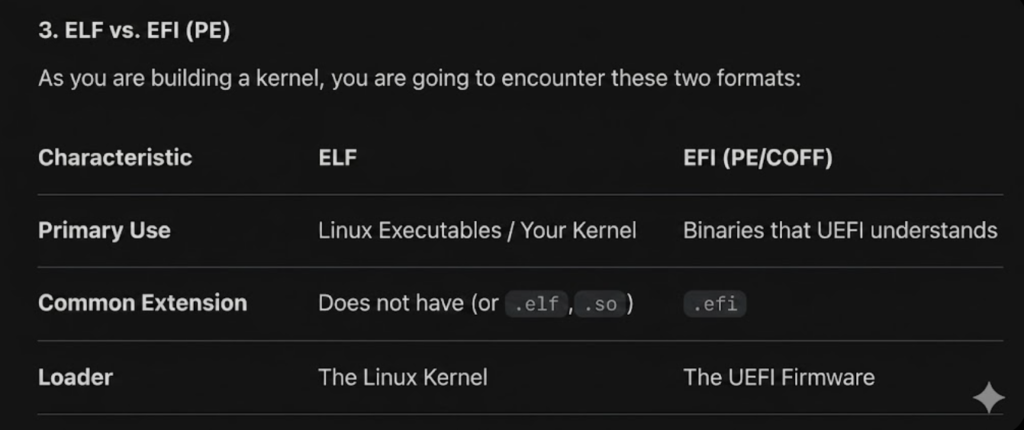
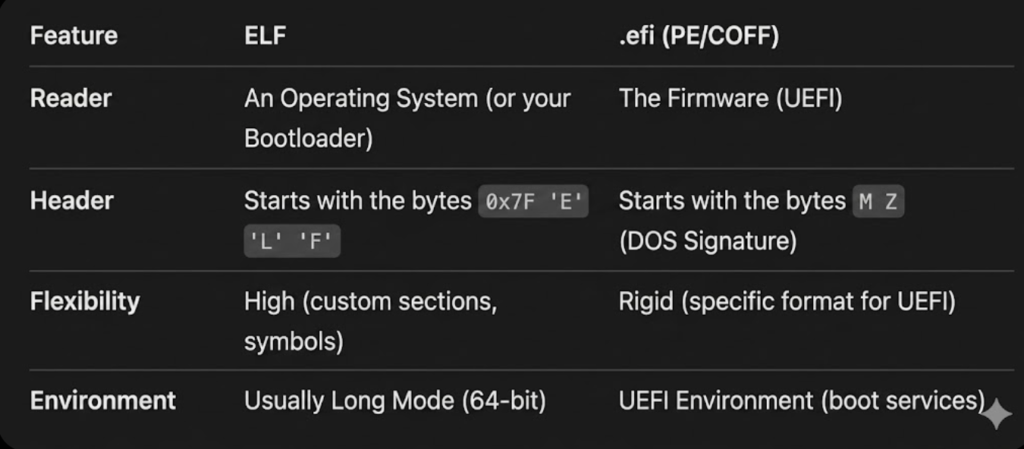
- .efi: It’s like an ID card. Without the card (the extension), you don’t get into the party (the UEFI)
- ELF: It’s like DNA. It doesn’t matter what your name is on the outside, what matters is what’s inside
ELF and EFI
Both are used as extensions, but they have different natures in terms of how the system handles them
.efi It is a mandatory extension: For the UEFI firmware to recognize a program as executable, it must have the .efi extension
If you put a file called boot (without an extension) in the ESP partition, most of the time the firmware won’t even look at it. It needs to see boot.efi to know that it’s an executable in PE/COFF format
ELF: It’s a “format,” not always an extension: In Linux (where ELF originated), extensions are not mandatory. A file simply named kernel can be an ELF file
ELF: Sometimes developers add the .elf extension (e.g., my_kernel.elf) just for organization and to know what type of file it is at a glance, but the operating system doesn’t care
ELF: Linux detects that it is an ELF by reading the first bytes of the file (the “Magic Number” 0x7F ELF), not looking at the extension
kernel.elf (or just kernel): The file that contains the heart of your system. You add .elf so you know what it is, but your bootloader.efi will load it by reading its internal structure, not its name
You can’t just rename a kernel.elf file to kernel.efi. UEFI is like a reader that only speaks “PE/COFF”
- Source code: .c and .h files
- Kernel binary: ELF format (compiled on Linux)
- Bootloader binary: .efi format (for Mac to boot)
Since you’ll be running code on “bare metal” (directly on the hardware, without a pre-existing operating system), when you compile that ELF file you need to use the -ffreestanding flag. This tells the compiler: “Don’t assume there’s a standard C library (like stdio.h), I’m going to program everything from scratch”
gcc generates a binary in Linux as ELF
yes
When you run the command gcc main.c -o kernel on your Ubuntu server, by default the “dump” of that code to machine language is packaged with the ELF structure
You don’t need to change your compiler, but rather how you use GCC
The best technical alternative is to configure a Cross-Compiler
- x86_64-elf-gcc
- It generates pure ELF code, without assuming an operating system, file path, or anything else
If you don’t want to compile GCC from scratch (which takes quite a while), you can use the “isolation” flags in your current GCC:
gcc -ffreestanding -nostdlib -fno-stack-protector -mno-red-zone -c kernel.c -o kernel.o- -ffreestanding: Tells the system that
mainandprintfdo not exist - -nostdlib: Do not attempt to link the C standard library
- -mno-red-zone: Crucial in x86_64 to prevent interrupts from crashing your stack (a very common kernel bug)
Many kernel developers today prefer Clang over GCC for one reason: it’s a native cross-compiler
clang --target=x86_64-elf -ffreestanding ...Since you no longer have printf, you have to build your own tools
- Write directly to video memory (VGA)
- Use UEFI Boot Services
- Create your own kprintf
ELF format validators
Make sure that what you compiled is not just “binary garbage”, but a well-formed executable that your bootloader will be able to understand
readelf -h mi_kernel.elfWhile readelf looks at the structure, objdump lets you see if the content makes sense.
objdump -d mi_kernel.elf | head -n 20file (fast):
file mi_kernel.elfThere are Online Validators and Visual Inspection